


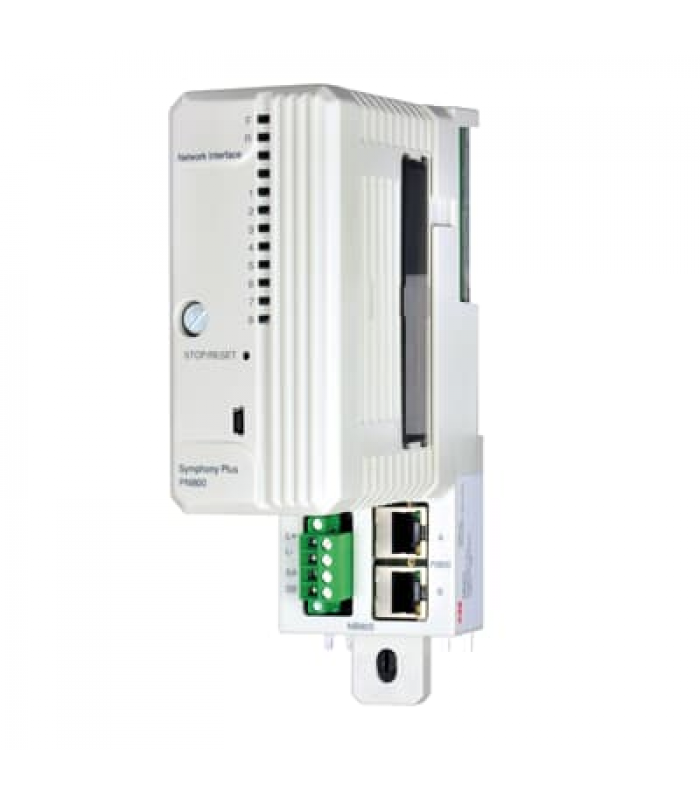
ABB PNI800 3BSE008544R1 Process Node Interface
- Product Code: ABB PNI800 3BSE008544R1
- Availability: In Stock
ABB PNI800 Process Node Interface
Product Code: 3BSE008544R1
Product Overview
The ABB PNI800 (3BSE008544R1) is a high-performance Process Node Interface designed for industrial automation systems. It serves as a critical communication gateway between field devices and control systems, enabling reliable data exchange in demanding industrial environments.
Technical Specifications
Hardware Configuration
- Processor: 32-bit RISC processor
- Memory: 128 MB RAM, 512 MB Flash
- I/O Ports: 4 x Ethernet, 2 x USB, 1 x Serial
- Expansion Slots: 2 x PCI Express
Environmental Ratings
- Operating Temperature: -20°C to +70°C
- Storage Temperature: -40°C to +85°C
- Humidity: 5% to 95% non-condensing
- IP Rating: IP54
Electrical Specifications
- Power Supply: 24 VDC ±10%
- Power Consumption: Max 30W
- Redundancy: Dual power inputs
- Protection: Overvoltage, reverse polarity
Supported Communication Protocols
| Protocol | Version | Interface | Description |
|---|---|---|---|
| EtherNet/IP | 2.0 | Ethernet | Industrial Ethernet protocol for real-time control |
| Modbus TCP | 1.1b | Ethernet | Open industrial communication protocol |
| PROFINET IO | V2.3 | Ethernet | Real-time Ethernet automation standard |
| OPC UA | 1.04 | Ethernet | Unified Architecture for industrial communication |
| BACnet/IP | 2016 | Ethernet | Building automation and control networks |
Installation Diagram
[Installation diagram placeholder]
Figure 1: PNI800 Installation and Wiring Diagram
Configuration Steps
-
Hardware Installation
- Mount the PNI800 in a suitable location following DIN rail mounting instructions
- Connect power supply to the terminal block (TB1)
- Connect network cables to Ethernet ports as required
- Install any additional I/O modules in the expansion slots
-
Initial Configuration
- Connect to the PNI800 using the web interface (default IP: 192.168.1.1)
- Log in with default credentials (admin/admin)
- Change the default password immediately
- Configure network settings for your environment
-
Protocol Configuration
- Enable required communication protocols
- Configure protocol-specific parameters
- Set up data mapping between protocols
- Test communication with connected devices
-
System Integration
- Integrate with your control system
- Configure alarm settings and notifications
- Set up monitoring and diagnostics
- Implement redundancy if required
Troubleshooting Guide
Power Issues
- Symptom: Power LED not lit
- Causes: Incorrect power supply, loose connections, blown fuse
- Solution: Check power supply voltage, inspect connections, replace fuse if necessary
Communication Problems
- Symptom: Cannot connect to web interface
- Causes: Incorrect IP settings, network issues, firewall blocking
- Solution: Verify IP configuration, check network connectivity, disable firewall temporarily
Protocol Errors
- Symptom: Protocol communication failures
- Causes: Incorrect protocol settings, incompatible devices, network congestion
- Solution: Verify protocol configuration, check device compatibility, monitor network traffic
Maintenance Schedule
| Maintenance Task | Frequency | Description |
|---|---|---|
| Firmware Update | Quarterly | Check for and apply latest firmware updates |
| Dust Removal | Monthly | Clean air filters and remove dust from ventilation |
| Backup Configuration | Monthly | Create and store backup of current configuration |
| Battery Replacement | Annually | Replace backup battery to ensure data retention |
| Full System Check | Semi-annually | Comprehensive inspection of all components and connections |
Safety Information
- Warning: Always disconnect power before installing or servicing the PNI800
- Warning: Ensure proper grounding to prevent electrical shock
- Caution: Do not exceed the specified voltage and current ratings
- Caution: Keep the device away from water and other liquids
- Note: Follow all local electrical codes and regulations
Documentation Revision History
| Revision | Date | Description |
|---|---|---|
| A | 2023-01-15 | Initial Release |
| B | 2023-04-22 | Added PROFINET IO v2.3 support information |
| C | 2023-09-08 | Updated troubleshooting section |
| D | 2024-02-14 | Added BACnet/IP protocol information |
Contact Information
ABB Customer Support
Phone: +1-800-ABB-HELP (1-800-222-4357)
Email: support@abb.com
Website: www.abb.com/support